---
title: Settings - Tool Manager
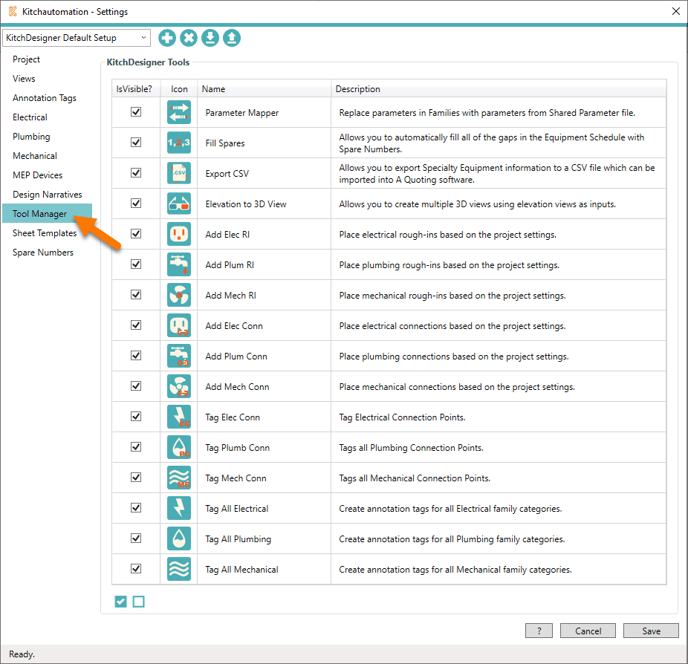
description: The tool manager allows you to control the visibility of the buttons on the KitchDesigner toolbar.
---
[Skip to content](https://support.kitchautomation.com/migration/knowledge/toolmanager#main-content)
English
Show submenu for translations
![Block K\_Large-1.png\]](https://support.kitchautomation.com/hs-fs/hubfs/Block%20K_Large-1.png?height=40&name=Block%20K_Large-1.png)
- [Default HubSpot Blog](https://academy.kitchautomation.com/how-to)
Open main navigation
Close main navigation
- [Default HubSpot Blog](https://academy.kitchautomation.com/how-to)
- English
Show submenu for translations
- Contact us
Contact us
Have a question? Search our Knowledge Base...
- There are no suggestions because the search field is empty.
1. [Kitchautomation Knowledge Base](https://support.kitchautomation.com/migration/knowledge?hsLang=en)
2. [User Manuals](https://support.kitchautomation.com/migration/knowledge/user-manuals?hsLang=en)
3. [Settings](https://support.kitchautomation.com/migration/knowledge/user-manuals?hsLang=en#settings)
# Settings - Tool Manager
## The tool manager allows you to control the visibility of the buttons on the KitchDesigner toolbar.
Tool Manager can be accessed from the Tool Manager tab in Settings or using the Tool Manager button on the ribbon.

Click on the Tool Manager button.
To hide one of the tools on the ribbon, deselect the checkbox next to the tool you wish to hide and select OK.
- [User Manuals](https://support.kitchautomation.com/migration/knowledge/user-manuals?hsLang=en#main-content)
- [KitchCreator](https://support.kitchautomation.com/migration/knowledge/user-manuals?hsLang=en#kitchcreator)
- [Settings](https://support.kitchautomation.com/migration/knowledge/user-manuals?hsLang=en#settings)
- [FAQ](https://support.kitchautomation.com/migration/knowledge/faq?hsLang=en)
- [Revit Tips](https://support.kitchautomation.com/migration/knowledge/revit-tips?hsLang=en)
- [Default HubSpot Blog](https://academy.kitchautomation.com/how-to)
[](https://support.kitchautomation.com/knowledge?hsLang=en)
Kitchautomation - Design More | Draft Less
Copyright © 2026, Kitchautomation, LLC