---
title: License Manager
description: The License Manager is where you activate your Product Key and Re-Verify your subscription, Re-Verifying is required if over 30 days pass since you last pinged our licensing servers.
---
[Skip to content](https://support.kitchautomation.com/migration/knowledge/licensemanager#main-content)
English
Show submenu for translations
![Block K\_Large-1.png\]](https://support.kitchautomation.com/hs-fs/hubfs/Block%20K_Large-1.png?height=40&name=Block%20K_Large-1.png)
- [Default HubSpot Blog](https://academy.kitchautomation.com/how-to)
Open main navigation
Close main navigation
- [Default HubSpot Blog](https://academy.kitchautomation.com/how-to)
- English
Show submenu for translations
- Contact us
Contact us
Have a question? Search our Knowledge Base...
- There are no suggestions because the search field is empty.
1. [Kitchautomation Knowledge Base](https://support.kitchautomation.com/migration/knowledge?hsLang=en)
2. [User Manuals](https://support.kitchautomation.com/migration/knowledge/user-manuals?hsLang=en)
# License Manager
## The License Manager is where you activate your Product Key and Re-Verify your subscription, Re-Verifying is required if over 30 days pass since you last pinged our licensing servers.
### Table of Contents
1. [Using the License Manager](https://support.kitchautomation.com/migration/knowledge/licensemanager#using-the-license-manager)
[1.1- Requesting a Free Trial Extension](https://support.kitchautomation.com/migration/knowledge/licensemanager#requesting-a-free-trial-extension)
[1.2- Activating your Free or Business Product Key](https://support.kitchautomation.com/migration/knowledge/licensemanager#activating-your-free-or-business-product-key)
[1.3- Re-verifying your active subscription](https://support.kitchautomation.com/migration/knowledge/licensemanager#re-verifying-your-active-subscription)
### 1. Using the License Manager
The License Manager serves three purposes:
- It is used to Request a free trial extension
- It is used to activate your Free or Business Product Key
- It is used to Re-verify your active subscription in the event it has been disabled due to inactivity.
#### 1.1- Requesting a Free Trial Extension

To being, click the License Manager button
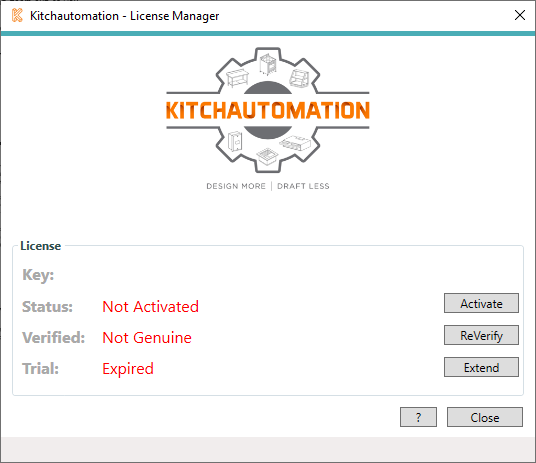
To request a Free Trial Extension, first click the  button.
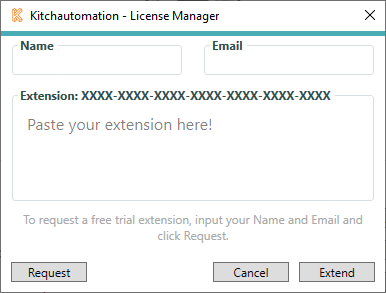
The Free Trial Extension window will appear.
To request an extension, type in your Name and Email in the text boxes at the top and click the  button. A request will immediately be sent and you will receive a response shortly.
If your request was granted, you will be emailed a Free Trial Extension Key. Paste this Key into the Extension area and click .
#### 1.2- Activating your Free or Business Product Key

To begin, click the License Manager button.

To activate your Free or Business subscription, click the  button.
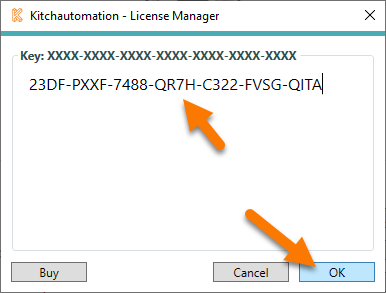
The activation window will appear where you can Paste in your Product Key.
If you need to obtain a KitchDesigner Free Product Key, click the  button to go to the [Kitchautomation Pricing Section](https://www.kitchautomation.com/#pricing) and click Download Now under the Free column. A Product Key will be displayed immediately after you submit your info and it will also be emailed to you.
If you need to obtain a KitchDesigner Business Product Key, click the  button and click Buy Now under the Business column. A Product Key will be displayed immediately after you submit your info and it will also be emailed to you.
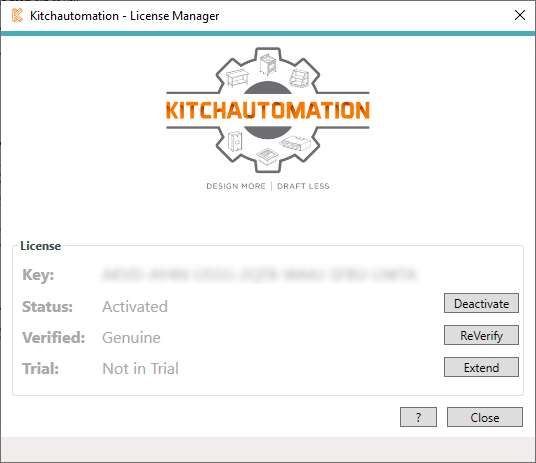
After you enter your Product Key, click  and your subscription will now be activated.
#### 1.3- Re-verifying your active subscription

To begin, click the License Manager button.

Kitchautomation uses a 3rd party licensing service to validate our subscriptions. This service relies on periodic check-ins to it's validation server. If there is a long period of inactivity, it is possible that your subscription will be disabled and you will need to use the  button.
If the period of inactivity is long enough, and clicking the  button does not Activate your subscription, please click the  button and then click the  button. This will clear the activation servers cache and your subscription will not be activated and ready to use.
If you have any trouble and need assistance, please reach out to us by using the Contact Support button.
[Back to Top](https://support.kitchautomation.com/migration/knowledge/licensemanager#table-of-contents)
- [User Manuals](https://support.kitchautomation.com/migration/knowledge/user-manuals?hsLang=en#main-content)
- [KitchCreator](https://support.kitchautomation.com/migration/knowledge/user-manuals?hsLang=en#kitchcreator)
- [Settings](https://support.kitchautomation.com/migration/knowledge/user-manuals?hsLang=en#settings)
- [FAQ](https://support.kitchautomation.com/migration/knowledge/faq?hsLang=en)
- [Revit Tips](https://support.kitchautomation.com/migration/knowledge/revit-tips?hsLang=en)
- [Default HubSpot Blog](https://academy.kitchautomation.com/how-to)
[](https://support.kitchautomation.com/knowledge?hsLang=en)
Kitchautomation - Design More | Draft Less
Copyright © 2026, Kitchautomation, LLC