---
title: How do I start using the KitchDesigner software after I install it?
description: Using the KitchDesigner software.
---
[Skip to content](https://support.kitchautomation.com/migration/knowledge/how-do-i-start#main-content)
English
Show submenu for translations
![Block K\_Large-1.png\]](https://support.kitchautomation.com/hs-fs/hubfs/Block%20K_Large-1.png?height=40&name=Block%20K_Large-1.png)
- [Default HubSpot Blog](https://academy.kitchautomation.com/how-to)
Open main navigation
Close main navigation
- [Default HubSpot Blog](https://academy.kitchautomation.com/how-to)
- English
Show submenu for translations
- Contact us
Contact us
Have a question? Search our Knowledge Base...
- There are no suggestions because the search field is empty.
1. [Kitchautomation Knowledge Base](https://support.kitchautomation.com/migration/knowledge?hsLang=en)
2. [FAQ](https://support.kitchautomation.com/migration/knowledge/faq?hsLang=en)
# How do I start using the KitchDesigner software after I install it?
## Using the KitchDesigner software.
KitchDesigner is a Revit add-in software containing over 25 individual and unique tools.
After installation you will see a new KitchDesigner ribbon tab installed between the Add-Ins and Modify ribbon tabs in Revit.
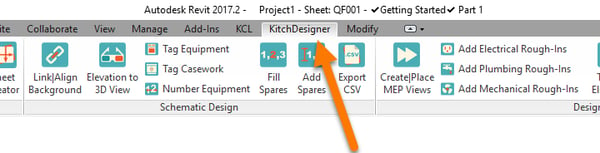
See the User Manuals in our Knowledge Base for more information on each of the specific tools on the KitchDesigner ribbon.
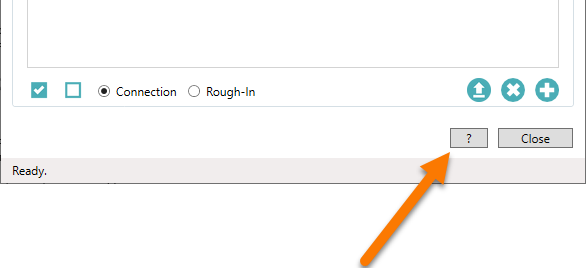You can also use the  button located at bottom of each tool to jump straight to that tool's user manual.
- [User Manuals](https://support.kitchautomation.com/migration/knowledge/user-manuals?hsLang=en#main-content)
- [KitchCreator](https://support.kitchautomation.com/migration/knowledge/user-manuals?hsLang=en#kitchcreator)
- [Settings](https://support.kitchautomation.com/migration/knowledge/user-manuals?hsLang=en#settings)
- [FAQ](https://support.kitchautomation.com/migration/knowledge/faq?hsLang=en)
- [Revit Tips](https://support.kitchautomation.com/migration/knowledge/revit-tips?hsLang=en)
- [Default HubSpot Blog](https://academy.kitchautomation.com/how-to)
[](https://support.kitchautomation.com/knowledge?hsLang=en)
Kitchautomation - Design More | Draft Less
Copyright © 2026, Kitchautomation, LLC