---
title: If I am using Revit, do I need to install AutoCAD to collaborate with an architect using AutoCAD?
description: No, when working in Revit you can still collaborate with architects and engineers using AutoCAD.
---
[Skip to content](https://support.kitchautomation.com/migration/knowledge/do-i-need-autocad-to-work-with-architects-using-autocad#main-content)
English
Show submenu for translations
![Block K\_Large-1.png\]](https://support.kitchautomation.com/hs-fs/hubfs/Block%20K_Large-1.png?height=40&name=Block%20K_Large-1.png)
- [Default HubSpot Blog](https://academy.kitchautomation.com/how-to)
Open main navigation
Close main navigation
- [Default HubSpot Blog](https://academy.kitchautomation.com/how-to)
- English
Show submenu for translations
- Contact us
Contact us
Have a question? Search our Knowledge Base...
- There are no suggestions because the search field is empty.
1. [Kitchautomation Knowledge Base](https://support.kitchautomation.com/migration/knowledge?hsLang=en)
2. [FAQ](https://support.kitchautomation.com/migration/knowledge/faq?hsLang=en)
# If I am using Revit, do I need to install AutoCAD to collaborate with an architect using AutoCAD?
## No, when working in Revit you can still collaborate with architects and engineers using AutoCAD.
Revit is able to link in and architect's AutoCAD file and use it as a background to your Revit drawing.
Once linked it is also possible to delete lines from the linked AutoCAD file from within Revit without having AutoCAD.
Use Link CAD to link the AutoCAD file.
Then click to select the linked file to reveal the Query tool.
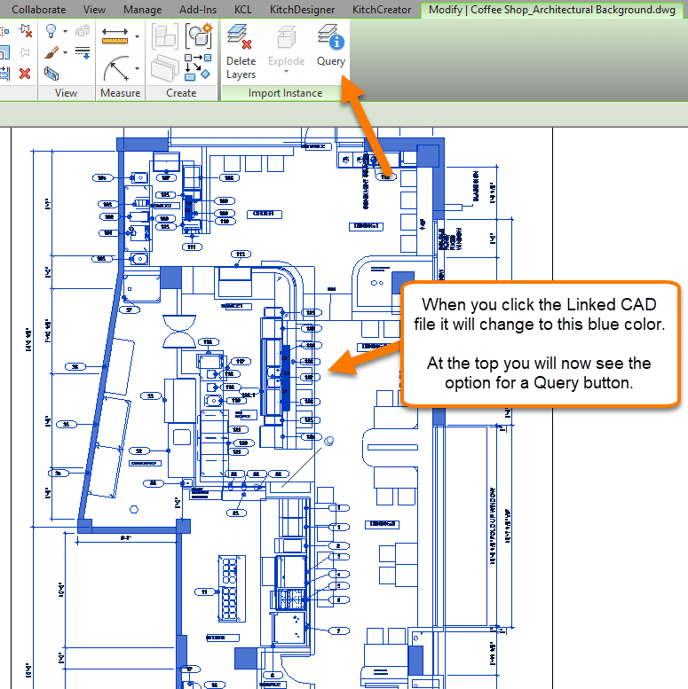
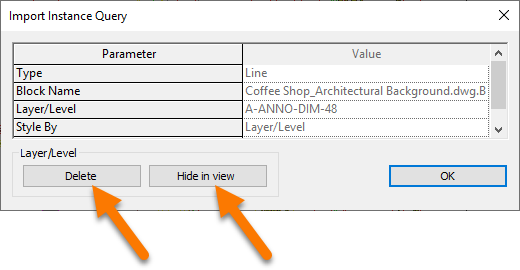
Use the Query tool to select a line in the AutoCAD file and Delete it or Hide It In View.
For a more in-depth tutorial, visit the "Designing in Revit with an Architect using AutoCAD" article in the Revit Tips section of our Knowledge Base.
[https://support.kitchautomation.com/knowledge/designing-in-revit-with-an-architect-using-autocad](https://support.kitchautomation.com/knowledge/designing-in-revit-with-an-architect-using-autocad?hsLang=en)
[Back to Top](https://support.kitchautomation.com/migration/knowledge/do-i-need-autocad-to-work-with-architects-using-autocad#back-to-top)
- [User Manuals](https://support.kitchautomation.com/migration/knowledge/user-manuals?hsLang=en#main-content)
- [KitchCreator](https://support.kitchautomation.com/migration/knowledge/user-manuals?hsLang=en#kitchcreator)
- [Settings](https://support.kitchautomation.com/migration/knowledge/user-manuals?hsLang=en#settings)
- [FAQ](https://support.kitchautomation.com/migration/knowledge/faq?hsLang=en)
- [Revit Tips](https://support.kitchautomation.com/migration/knowledge/revit-tips?hsLang=en)
- [Default HubSpot Blog](https://academy.kitchautomation.com/how-to)
[](https://support.kitchautomation.com/knowledge?hsLang=en)
Kitchautomation - Design More | Draft Less
Copyright © 2026, Kitchautomation, LLC