---
title: Settings - Create Generic Annotation
description: When selecting a Connection Point in Settings, there is an option to create Connection Points using the Generic Annotation Creator. Connection Points are Generic Annotation families in Revit.
---
[Skip to content](https://support.kitchautomation.com/migration/knowledge/createannotation#main-content)
English
Show submenu for translations
![Block K\_Large-1.png\]](https://support.kitchautomation.com/hs-fs/hubfs/Block%20K_Large-1.png?height=40&name=Block%20K_Large-1.png)
- [Default HubSpot Blog](https://academy.kitchautomation.com/how-to)
Open main navigation
Close main navigation
- [Default HubSpot Blog](https://academy.kitchautomation.com/how-to)
- English
Show submenu for translations
- Contact us
Contact us
Have a question? Search our Knowledge Base...
- There are no suggestions because the search field is empty.
1. [Kitchautomation Knowledge Base](https://support.kitchautomation.com/migration/knowledge?hsLang=en)
2. [User Manuals](https://support.kitchautomation.com/migration/knowledge/user-manuals?hsLang=en)
3. [Settings](https://support.kitchautomation.com/migration/knowledge/user-manuals?hsLang=en#settings)
# Settings - Create Generic Annotation
## When selecting a Connection Point in Settings, there is an option to create Connection Points using the Generic Annotation Creator. Connection Points are Generic Annotation families in Revit.
To access the Generic Annotation Creator, first select a Connection Point in Settings.
#### Creating a Connection Point
Go to the Connection Point side of either the Electrical, Plumbing, or Mechanical Settings.
Click the C to go to the Connection Point Placement UI.
Select a Connection Point using the  button.
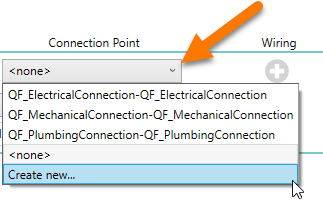Generic Annotation families can be selected from the dropdown list.
Select *Create New...* to create a Generic Annotation family to be used as a Connection Point by the Add MEP Connection Point tools.
Once you click *Create New...* the Generic Annotation Creator window will appear.
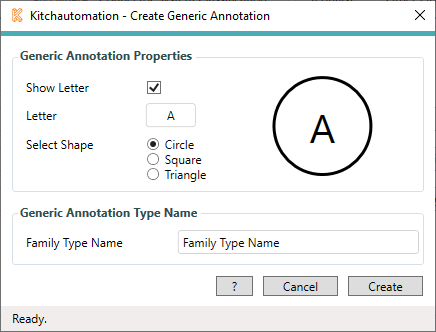
You can create your own Generic Annotation family using (3) different shapes and your choice of (1) or (2) letters in the inside of your shape.
Make your selections and to see a preview of what your Generic Annotation will look like. (not to scale)
Give your new family a unique name and click  to create a Generic Annotation family and add it to your project.
This newly created family will now be selectable as a Connection Point.
[Back to Top](https://support.kitchautomation.com/migration/knowledge/createannotation#back-to-top)
- [User Manuals](https://support.kitchautomation.com/migration/knowledge/user-manuals?hsLang=en#main-content)
- [KitchCreator](https://support.kitchautomation.com/migration/knowledge/user-manuals?hsLang=en#kitchcreator)
- [Settings](https://support.kitchautomation.com/migration/knowledge/user-manuals?hsLang=en#settings)
- [FAQ](https://support.kitchautomation.com/migration/knowledge/faq?hsLang=en)
- [Revit Tips](https://support.kitchautomation.com/migration/knowledge/revit-tips?hsLang=en)
- [Default HubSpot Blog](https://academy.kitchautomation.com/how-to)
[](https://support.kitchautomation.com/knowledge?hsLang=en)
Kitchautomation - Design More | Draft Less
Copyright © 2026, Kitchautomation, LLC